A solar inverter red light means the unit has detected a fault or protective condition and has stopped or limited power production. In most U.S. homes this is triggered by grid voltage swings, a tripped breaker, overheating, an isolation/ground fault, or a communication issue not a dead inverter. Note the exact error code on the display or monitoring app first, then follow the safe reset steps below. If the red light returns after one proper power cycle, contact a qualified technician.
Seeing a red light on your solar inverter can feel alarming, especially when your system suddenly stops producing power. This guide shows you how to read solid versus blinking red indicators, check your monitoring app for error codes, perform a safe AC-then-DC power cycle, and know exactly when to call a professional.
This guide shows you how to read solid versus blinking red indicators, check your monitoring app for error codes, perform a safe AC-then-DC power cycle, and know exactly when to call a professional.
What Does a Red Light on a Solar Inverter Mean?
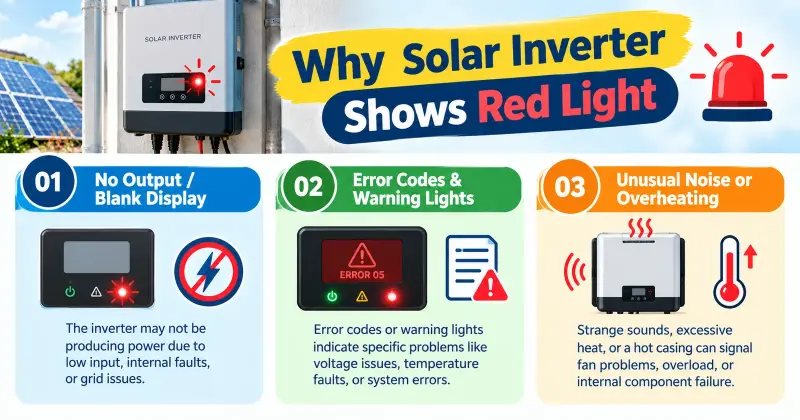
A solar inverter red light means the unit has detected a fault or protective condition and has either stopped producing power or limited its output. This is the first clear signal that something needs attention.
Solid Red vs Blinking/Flashing Red
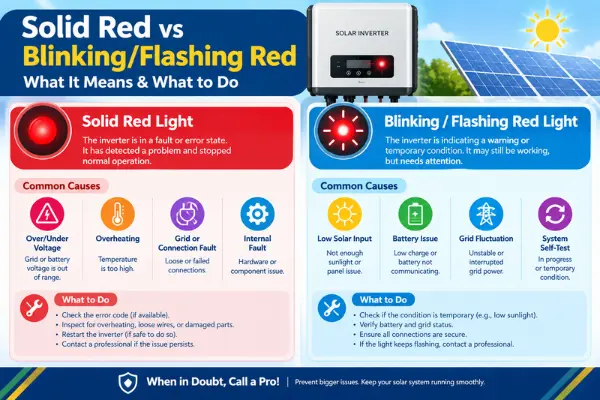
A solid solar inverter red light usually means the inverter has shut down completely due to an active fault it cannot clear on its own. Power production stops until the issue is fixed or the unit is properly reset.
A blinking or flashing red light often indicates a temporary condition. The inverter may be waiting for grid voltage to stabilize, attempting to reconnect, or signaling a warning that has not yet forced a full shutdown. Many blinking red lights clear after a short wait or a correct power cycle.
Green, Yellow/Amber & Red – What Each Color Means
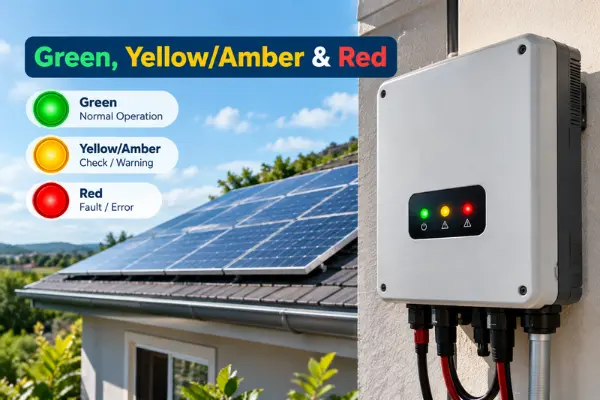
Most residential inverters use a simple three-color system:
- Green – Normal operation. The system is producing power or is ready to produce when sunlight is available.
- Yellow or Amber – Warning or standby. The inverter has detected a non-critical issue such as grid fluctuation or temporary communication loss and is waiting for conditions to improve.
- Red – Fault. The inverter has stopped or restricted production because it detected something outside safe operating limits.
Knowing whether the solar inverter red light is solid or blinking, and what the other LEDs show, is the fastest first step before checking error codes or performing a reset.
Most Common Causes of a Solar Inverter Red Light in the US
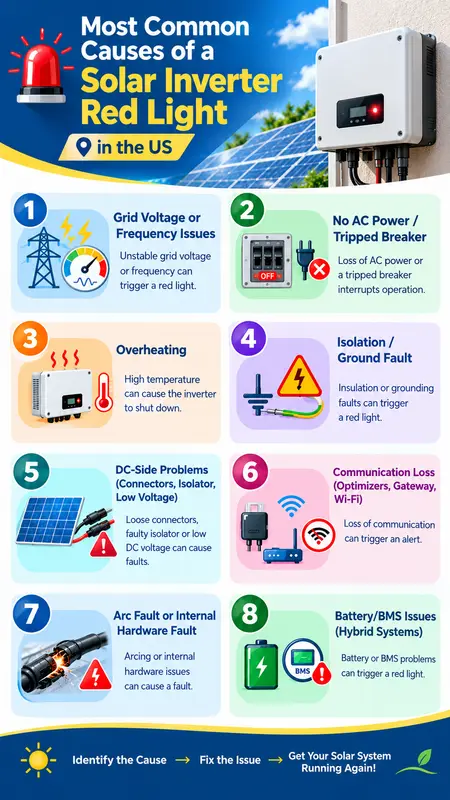
A solar inverter red light almost always points to one of a few repeatable problems. In U.S. homes these are the causes that appear most often.
1. Grid Voltage or Frequency Issues
This is the single most common trigger. When utility voltage or frequency drifts outside the inverter’s allowed range, the unit disconnects automatically. High-solar states like California, Texas, and Arizona see this frequently on sunny afternoons. Most events clear once the grid stabilizes.
2. No AC Power / Tripped Breaker
If the house loses grid power or the solar breaker trips, the inverter cannot stay online. A quick check of the main solar panel and the dedicated solar breaker often solves the issue.
3. Overheating
Inverters shut down or reduce output when they get too hot. Poor airflow, direct sun, dust, or extreme summer heat are the usual reasons. Many units restart on their own after cooling.
4. Isolation / Ground Fault
The inverter detects current leaking to ground on the DC side. Moisture in connectors, damaged cables, or failing solar panel insulation are typical causes. This fault is more serious and often needs a technician if it returns after a reset.
5. DC-Side Problems (Connectors, Isolator, Low Voltage)
Loose MC4 connectors, an open DC isolator, or low string voltage from shading or a bad panel can all force a solar inverter red light.
6. Communication Loss (Optimizers, Gateway, Wi-Fi)
When the inverter loses contact with optimizers, microinverters, or the monitoring gateway, a red light or communication fault appears. Weak Wi-Fi and offline optimizers are common on SolarEdge and Enphase systems.
7. Arc Fault or Internal Hardware Fault
Newer systems shut down if they detect a possible arc in the DC wiring. Internal failures (capacitors, fans, power stages) become more common after 8–10 years.
8. Battery/BMS Issues (Hybrid Systems)
On hybrid systems a red light often means a battery communication error, wrong voltage, or BMS protection event.
Most solar inverter red light cases fall into the first four categories. Starting with grid conditions, breakers, temperature, and a proper power-cycle reset fixes the majority without a service call.
Safe Step-by-Step Solar Inverter Troubleshooting
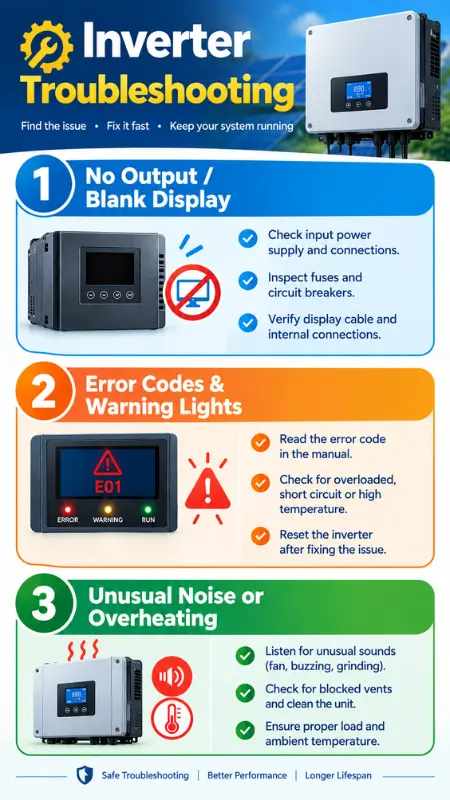
A solar inverter red light can often be cleared at home if you follow the correct sequence. Do these steps in order and do not skip any.
1. Check Display & Monitoring App for Error Code
Look at the inverter screen and open your monitoring app. Write down the exact error or event code before you do anything else. This code is the most useful information you can give a technician later.
2. Confirm House Power & Breakers
Make sure the rest of the house has power. Check the main service panel and the dedicated solar AC breaker. If either has tripped, reset it and watch the inverter.
3. Visual Inspection
Check for blocked vents, heavy dust, direct sun on the inverter, or any visible damage. Confirm both the AC and DC disconnect switches are turned ON. Do not open the inverter cover.
4. Proper Power-Cycle Reset (AC → DC → Wait → DC → AC)
Turn the AC disconnect (or solar breaker) OFF first.
- Then turn the DC disconnect OFF.
- Wait a full 5–10 minutes.
- Turn the DC disconnect ON first.
- Finally turn the AC disconnect ON.
This is the safe and correct reset order for most residential inverters.
5. Wait & Recheck Production
Allow 10–15 minutes for the inverter to reboot. Check the lights and your monitoring app. A green light and returning production mean the fault has cleared.
6. What to Do If Red Light Returns
If the solar inverter red light comes back right away or shows the same code, stop resetting. Take a photo of the display, note the code, and call a qualified technician. Repeated resets can hide the real problem and are not safe with isolation or arc-fault codes.
How Much Does It Cost to Fix a Solar Inverter Red Light?
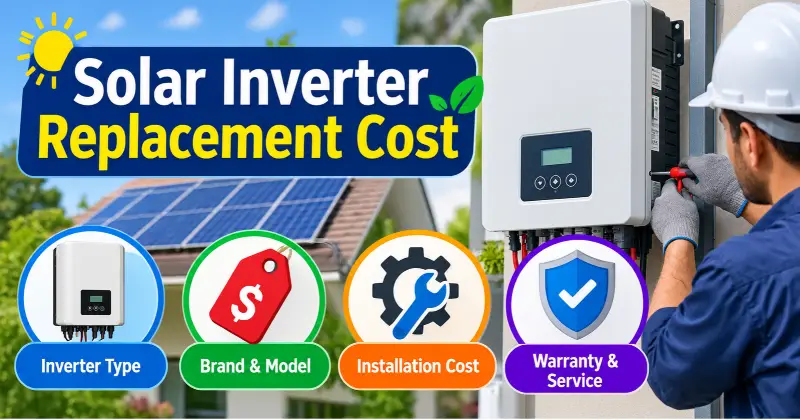
Most solar inverter red light issues cost nothing to fix if a simple power-cycle reset clears the fault. When a technician is needed, U.S. homeowners in 2026 typically pay $100–$300 for a diagnostic visit, $150–$500 for minor field repairs, and $1,000–$2,500 for a full string inverter replacement (installed). Microinverter replacements run $150–$350 per unit, while hybrid inverter swaps land between $2,000 and $4,500.
| Service Type | Estimated Cost |
| DIY power-cycle reset | $0 |
| Diagnostic / service visit | $100 – $300 |
| Minor repairs (wiring, fuses, communication) | $150 – $500 |
| Intermediate repairs (components, surge) | $300 – $700 |
| String inverter replacement (installed) | $1,000 – $2,500 |
| Microinverter replacement (per unit) | $150 – $350 |
| Hybrid inverter replacement (installed) | $2,000 – $4,500 |
Prices vary by region, inverter brand, system size, roof access, and whether the unit is still under warranty. Many manufacturers cover hardware under 10 to 25 year warranties, but labor is often the homeowner’s responsibility unless a labor-inclusive plan was purchased.
Solar Inverter Red Light Meaning by Brand (SolarEdge, Enphase, SMA & More)
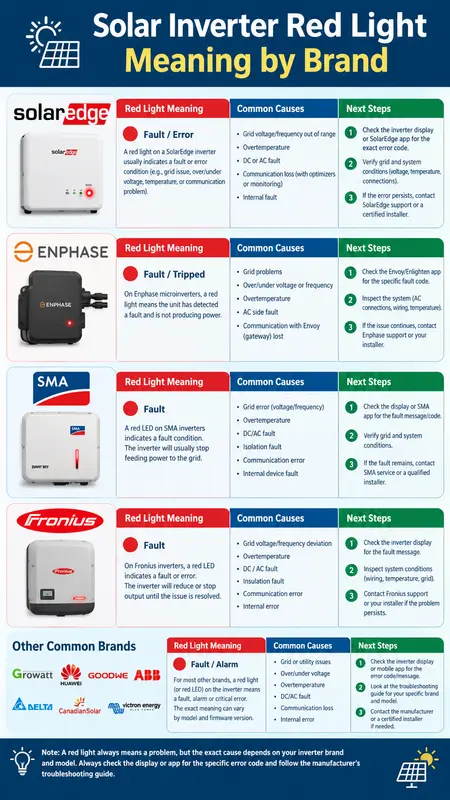
A solar inverter red light does not mean the same thing on every brand. The exact meaning depends on the manufacturer’s LED system and monitoring platform. Here is what the most common U.S. systems show and what to do first.
SolarEdge
A red LED on a SolarEdge inverter means the system has detected an error and has stopped or limited production. Green shows power production and blue shows communication with the monitoring platform. Open the mySolarEdge app right away and note the exact error code. Many grid-related faults clear after a proper power-cycle reset. Isolation, arc-fault, or hardware codes usually need a technician.
Enphase
Enphase systems use microinverters, so the red light usually appears on the Envoy or IQ Gateway. A solid red production or device-communication LED means one or more microinverters have stopped producing or are not communicating. Flashing red often appears during startup. Check the Enphase App for the status of each microinverter. Most temporary issues clear after a gateway power cycle.
SMA
SMA inverters show a red LED when an event or fault has occurred. The display or Sunny Portal / SMA Energy app shows the exact event number. Solid red commonly points to an insulation fault, ground fault, or internal error. Blinking red can indicate a temporary grid issue. Record the event code before resetting.
Fronius & Other Common Brands
On Fronius units a solid red operating LED signals a critical error that has stopped grid feed-in. Yellow usually means a non-critical warning. Check Solar.web for the status code. Other brands such as Growatt, Solis, or Tesla follow the same basic rule: red equals fault, and the monitoring app or display gives the specific code you need.
When to Call a Professional for a Solar Inverter Red Light
A solar inverter red light can often be cleared with a proper reset. Some situations, however, require a qualified technician. Knowing the difference protects both your system and your safety.
Situations Where DIY Reset Is Not Enough
Call a professional if the red light returns immediately after one correct power-cycle reset. Do the same if the monitoring app shows an isolation fault, ground fault, or arc-fault code. These faults can involve damaged wiring or moisture and should not be repeatedly reset.
Contact a technician if you notice a burning smell, unusual noise, visible damage, or no production for more than a few hours on a clear sunny day. Recurring faults that appear at the same time each day also need professional diagnosis. Never open the inverter cover or attempt internal repairs yourself.
What Information to Give the Technician
Have these details ready before you call:
- Inverter brand and model number
- Exact error or event code from the display or monitoring app
- Photo of the LEDs and any on-screen message
- When the red light first appeared and whether it returns after a reset
- Recent weather conditions and any recent electrical work at the house
This information helps the technician diagnose the problem faster and reduces the chance of an unnecessary second visit.
How to Prevent Future Red-Light Issues
Most solar inverter red light events can be reduced with simple, regular habits. These practical steps lower the chance of repeat faults and keep the system producing reliably.
- Keep the inverter clear of dust, leaves, and debris so airflow stays unrestricted.
- Avoid placing objects against the unit or blocking the vents.
- In hot climates, provide shade from direct afternoon sun to reduce overheating.
- Check the monitoring app weekly for early alerts on temperature, communication, or grid issues.
- Make sure both the AC and DC disconnect switches remain freely accessible.
- After heavy rain or storms, visually inspect visible connectors and the area around the inverter.
- Schedule a professional inspection every few years, especially after the system reaches 8–10 years of age.
These simple habits significantly reduce the frequency of solar inverter red light problems and help catch issues before they stop production.
Frequently Asked Questions
Why is my solar inverter showing a red light?
A solar inverter red light means the unit has detected a fault or protective condition and has stopped or limited power production. The most common causes in the U.S. are grid voltage issues, a tripped breaker, overheating, an isolation fault, or a communication problem. Note the exact error code on the display or monitoring app before taking any action.
Can I reset a solar inverter myself?
Yes, most temporary faults can be cleared with a proper power-cycle reset. Turn the AC disconnect off first, then the DC disconnect. Wait 5–10 minutes, turn the DC back on, and finally turn the AC back on. Do this only once. If the red light returns immediately, stop and contact a technician.
What does a blinking red light mean?
A blinking or flashing red light usually indicates a temporary or recoverable condition. The inverter may be waiting for the grid to stabilize or attempting to restart. A solid red light more often means a persistent fault that has fully stopped production. Always check the monitoring app for the specific code.
How long should I wait before calling for service?
If the red light clears within a couple of hours and production returns, it was likely a temporary event. Call a technician if the light stays on after one proper reset, returns repeatedly, or appears with an isolation, ground, or arc-fault code. Also call if there is no production for more than a few hours on a sunny day.
Does a red light mean my inverter is dead?
No. Most solar inverter red light events are temporary and do not mean the inverter has failed. Grid disturbances, overheating, and communication issues are far more common than complete hardware failure. Only repeated faults or specific error codes after a correct reset usually point to a problem that needs repair or replacement.
Conclusion
A solar inverter red light is a clear signal that something needs attention, but it is rarely a sign that the inverter has completely failed. Most cases in U.S. homes are caused by temporary grid issues, a tripped breaker, overheating, or a communication problem that can be resolved with a careful power-cycle reset.
Start by noting the exact error code, check your breakers and monitoring app, then follow the safe reset sequence. If the red light returns or the code points to an isolation, ground, or arc fault, contact a qualified technician with the details ready. Simple habits like keeping the inverter clean, monitoring the app regularly, and scheduling occasional professional checks will reduce the chance of future red-light events and keep your system producing reliably.